IT Automation for Small Businesses: Save Time, Reduce Costs, and Work Smarter
Discover how IT automation for small businesses can reduce repetitive work, improve cybersecurity, minimize downtime, and help your team save time and costs.
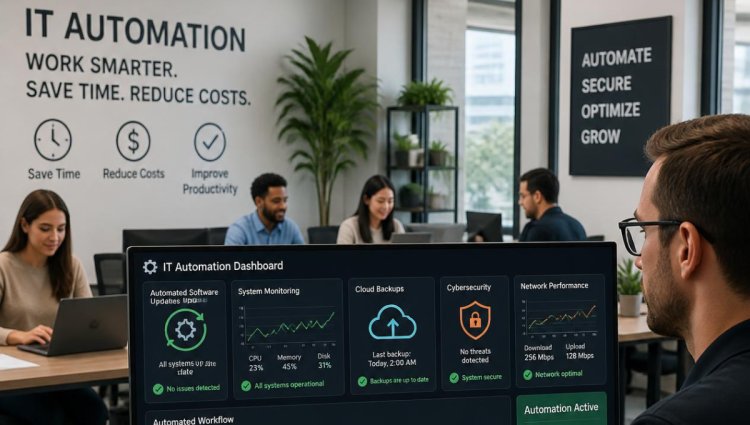
Running a small business means making the most of every hour, every employee, and every dollar. But when your team spends valuable time dealing with repetitive IT tasks—installing updates, checking systems, managing passwords, monitoring devices, or troubleshooting common issues—productivity can quickly take a hit.
This is where IT automation for small businesses can make a real difference.
Instead of relying on employees or IT staff to manually handle the same tasks over and over, automation allows technology to take care of routine processes automatically. The result? Less wasted time, fewer avoidable mistakes, and an IT environment that is easier to manage.
For businesses working with LA IT Consultants, automation can also become part of a broader strategy for improving IT efficiency, security, and reliability.
What Is IT Automation?
IT automation uses software and technology to perform routine IT tasks with little or no human intervention.
Think about the tasks your business performs every week. Software updates need to be installed. Computers need to be monitored. Backups need to run. Security alerts need to be checked. New employees need access to applications and accounts.
Many of these processes follow predictable steps, making them ideal candidates for automation.
For example, instead of someone manually checking whether every computer has the latest security updates, an automated system can monitor devices and deploy approved updates according to predefined policies.
Automation doesn't eliminate the need for people. Instead, it gives your employees more time to focus on work that actually requires human judgment.
How IT Automation Saves Small Businesses Time
Time is one of the most valuable resources for a small business. When employees spend less time on repetitive IT tasks, they have more time for customers, projects, sales, and other business priorities.
1. Automated Software Updates
Keeping software updated is important for both security and performance. However, manually checking and updating multiple computers can become a tedious task.
With automated software updates, approved patches and updates can be scheduled and deployed across business devices.
This means your team doesn't have to remember to update every computer individually.
It can also help reduce the risk of employees continuing to use outdated software that may contain known security vulnerabilities.
2. Proactive System Monitoring
Waiting until a computer, server, or network stops working can be expensive.
Modern IT monitoring tools can continuously watch systems for unusual activity, performance problems, storage issues, or other warning signs.
When a potential issue appears, the system can generate an alert—or, in some cases, automatically take corrective action.
This proactive approach can help businesses identify problems before they become major disruptions.
3. Automated Backups
Data is one of the most important assets a business has. Losing important files because of hardware failure, accidental deletion, ransomware, or another incident can create serious problems.
Automated data backup removes the need for employees to remember to back up important information manually.
A properly configured backup solution can run according to a predetermined schedule and help ensure that important business data is regularly protected.
Of course, automation should be paired with proper backup testing and a recovery strategy. A backup is only useful if you can successfully restore the data when you need it.
4. Faster Employee Onboarding
Hiring a new employee often involves creating accounts, setting permissions, configuring devices, and providing access to business applications.
When these processes are handled manually, onboarding can take considerable time.
With IT automation, many onboarding steps can be standardized. Once an employee's role is established, automated workflows can help ensure that the right accounts, applications, and permissions are configured consistently.
This can make the first day smoother for both the employee and the IT team.
How IT Automation Can Reduce Costs
Saving time is valuable, but automation can also help control IT expenses.
For small businesses, the goal isn't necessarily to automate everything. The goal is to automate the right things.
Fewer Manual IT Hours
Routine IT tasks can consume hours every month. When those tasks are automated, employees and IT professionals can spend more time on higher-value activities.
For a small business, even a few hours saved every week can add up significantly over a year.
Fewer Human Errors
Manual processes can lead to mistakes.
Someone might forget to install an update, configure a device incorrectly, or overlook an important system alert.
Automated processes follow predefined rules consistently. While automation isn't completely error-proof, it can reduce the number of mistakes associated with repetitive manual work.
Reduced Downtime
Downtime can be particularly costly for small businesses because teams are often smaller and resources are limited.
Proactive IT management can help identify potential problems earlier. Automated monitoring and alerts can give IT teams an opportunity to address issues before they interrupt business operations.
The less time employees spend waiting for technology to work, the more productive the business can be.
IT Automation Can Improve Cybersecurity
Automation isn't just about convenience. It can also support a stronger IT security strategy.
Businesses deal with an increasing number of cybersecurity threats, and small businesses are not immune.
Automated security tools can help with tasks such as monitoring systems, applying security patches, detecting suspicious activity, and generating alerts.
For example, if a critical security update becomes available, an automated patch management system can help ensure that eligible devices receive the update without relying on every employee to remember to install it.
This is especially useful for businesses that have employees working remotely or across multiple locations.
However, automation should complement—not replace—good cybersecurity practices. Employee training, access controls, strong passwords, multi-factor authentication, regular backups, and security policies remain important.
Is IT Automation Only for Large Companies?
Not at all.
In fact, IT automation for small businesses can be especially valuable because smaller teams often have fewer people available to manage technology.
A company doesn't need hundreds of employees or a huge IT department to benefit from automation.
A small business might start with a few practical areas:
- Automated software and security updates
- Device and network monitoring
- Automated backups
- Password and account management
- Employee onboarding workflows
- Security alerts
- Routine maintenance
The key is to identify repetitive tasks that consume time and determine whether automation can handle them reliably.
How to Get Started With IT Automation
If your business is new to automation, don't try to automate everything at once.
Start by identifying the IT tasks your team performs repeatedly.
Ask questions such as:
Which IT tasks take the most time?
Which tasks are performed manually every week?
Which processes are most likely to be forgotten?
Where do employees frequently encounter technical problems?
Once you've identified these areas, prioritize tasks that are repetitive, predictable, and relatively easy to standardize.
A professional IT partner such as LA IT Consultants can help evaluate your existing technology environment and identify practical opportunities for automation.
The right approach should be based on your business—not simply on adding more software.
The Bottom Line
Technology should help your business move forward, not create more work.
By implementing IT automation, small businesses can reduce repetitive tasks, improve consistency, strengthen security, and give employees more time to focus on meaningful work.
The biggest benefit isn't simply doing things faster. It's creating an IT environment that is more predictable, proactive, and easier to manage.
For many small businesses, the best place to start is simple: identify one repetitive IT task that consumes time every week and ask whether technology can handle it automatically.
That small change could be the beginning of a much more efficient IT strategy.
If you're looking for ways to improve your company's technology environment, LA IT Consultants can help you identify practical opportunities for automation and more proactive IT management.
Frequently Asked Questions
1. What is IT automation for small businesses?
IT automation for small businesses means using software and technology to automatically perform repetitive IT tasks such as software updates, system monitoring, backups, and account management. It helps reduce manual work and improve consistency.
2. Can IT automation reduce business costs?
Yes. IT automation can reduce the amount of time employees and IT professionals spend on repetitive tasks. It can also help reduce errors, prevent some avoidable downtime, and improve the efficiency of existing IT resources.
3. Is IT automation useful for businesses without a large IT department?
Absolutely. Small businesses can benefit significantly from automation because they often have limited IT resources. Automating routine tasks allows employees to spend more time on important business activities.
4. Does IT automation improve cybersecurity?
It can. Automated patching, monitoring, security alerts, and other processes can help businesses respond to potential security issues more consistently. However, automation should be part of a broader cybersecurity strategy that includes employee training, access controls, backups, and other security measures.
5. How can a small business get started with IT automation?
Start by identifying repetitive IT tasks that take significant time or are frequently forgotten. Then determine which tasks can be safely standardized and automated. An experienced IT provider such as LA IT Consultants can help identify suitable automation opportunities based on your current systems and business needs.
https://laitconsultants.com/
818 789-6600